Elixir True Peak Limiter is based around the same ultra transparent algorithm as the legacy Elixir v3, meticulously designed to achieve a true natural sounding result preserving the natural timbre of the audio material, used by recording and mastering engineers for almost a decade now. Supporting up to 32 channels, conforming with the ITU-R and EBU loudness norms, makes Elixir an indispensable tool for immersive audio productions including Dolby Atmos
Elixir
True natural sounding, preserving natural timbre of the material, ITU-R BS.1770 / EBU R128 compliant real True Peak output, up to 32 channels for multichannel/immersive workflows including Dolby Atmos.
Immersive audio production, including Dolby Atmos
With Immersive Audio being the new driving force in the entertainment industry a new era in audio production is taking shape. Elixir supports up to 32 channels of processing making it the indispensable tool for Immersive Audio production, including Dolby Atmos workflows. You can either control the dynamic of the multiple 7.1.2 beds you are sending to the Dolby Atmos renderer, or, limit your monitoring level.
Quick and easy setup
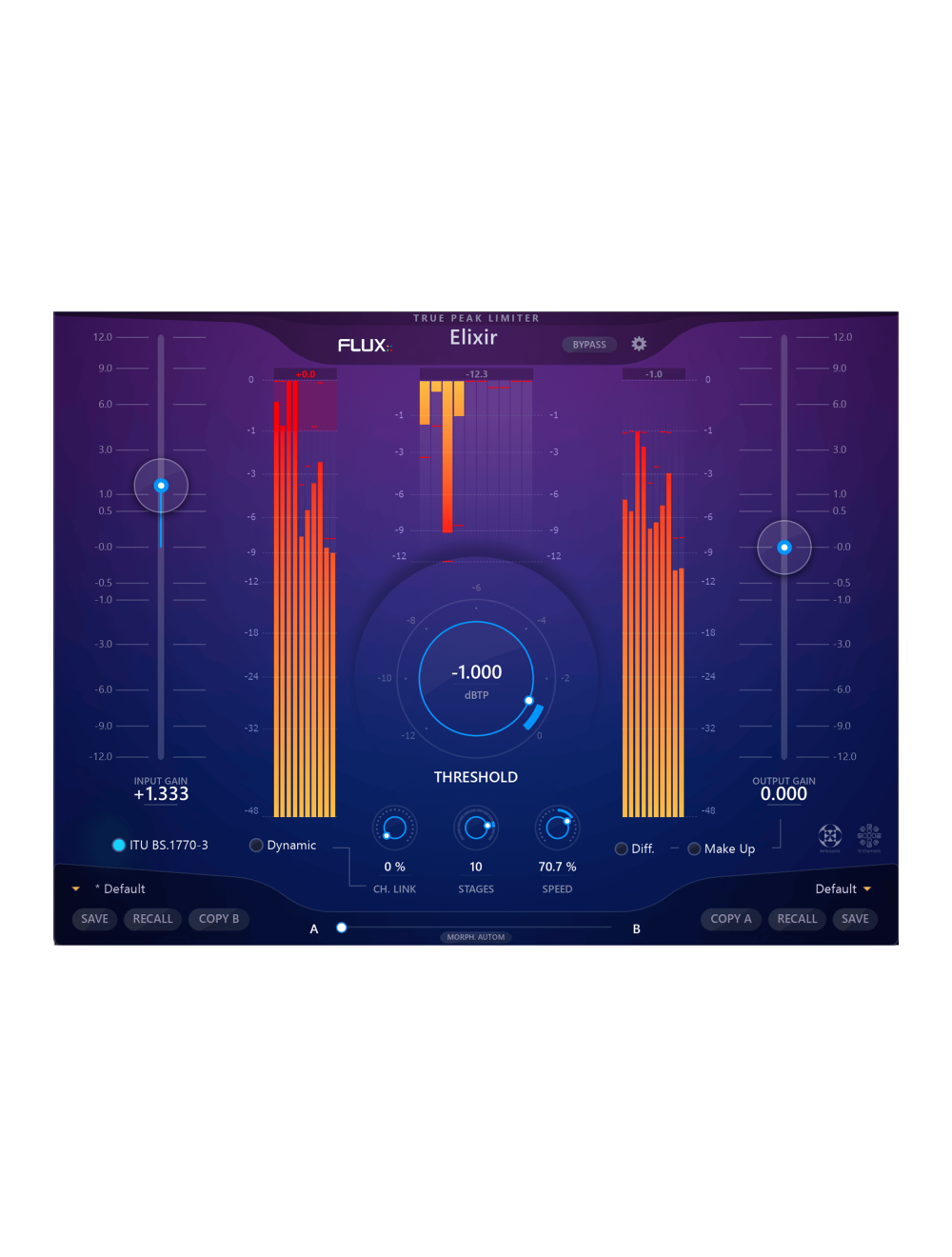
Elixir’s straightforward user interface makes it exceptionally easy to achieve great results, even under a tight deadline. Simply set the input level, adjust the Threshold according to the amount of limiting desired, and finally enable Make Up for gain compensation and loudness addition – That’s it!
Meeting the broadcast, post-production, and mastering industry norms with real True Peak output in accordance with the ITU-R BS.1770 and EBU R128 norms.
Now supporting up to 32 channels
Provides up to 32 channels of processing, operating at sample rates up to 384kHz.
Multistage processing in up to 12 stages
The multistage processing provides the option to set the algorithm to perform the limiting processing in multi-stages with up to 12 stages, for even more precise and natural sounding results.
64-bit float audio processing
64-bit float audio processing mode has been engaged in order to allow for end to end 64 bit audio with DAWs/Hosts supporting this.
Revamped optimized user interface
The GUI has been completely modernized, with the workflow overhauled to enhance the user experience, and optimized to visually control the whole audio content.
Now with scalable user interface in 6 steps
The user interface is now scalable in 6 steps to easily adapt to the screen resolution of the DAW workstation; 800×600, 1000×750, 1200×900, 1300×975, 1600×1200, and 2000×1500.
Full control over the gain structure
Input / Output Gain (-12/+12 dB) applied to the limiter input, and to the output stage of the limiter.
True bypass
True bypass routing the incoming signal direct to the output for a true smooth transition between clean and processed signal.
Preset and Parameter Handling
Preset/Parameter slots
To enhance the workflow the two Preset/Parameter slots, A and B, can be loaded with two full set of parameters at the same time. Apart from saving each preset, a “Global Preset” containing both the A and B settings, and the position of the “Morphing Slider”, can be saved.
Parameter Morphing Slider with Automation
The Morphing Slider provides morphing between the parameter settings of slot A/B allowing for really creative and useful real-time tweaking. Enabling the Automation control button exposes the Morphing Slider to the host automation.
Preset manager
The preset manager contains three preset banks; Factory bank, which Contains factory presets. Saving presets in the Factory bank is not allowed, but any of the Factory presets can be recalled into a preset section and then saved into the User bank instead, which ontains user presets only. The Global bank contains Global presets. A Global preset is a complete snapshot with all the settings from both of the preset sections as well as the position of the Preset A/B Switch
True Peak Presets
True Peak presets are available in the preset manager which are meeting the output true-peak recommendations such as; Youtube, Spotify, Apple Music and Netflix, and others.
OS Compatibility
Windows 10 / 11 – 64bit only
MacOS 10.14.6 Mojave and latest
Hardware Specification
Apple Silicon Universal Binary ARM M1, M2, and M3 Supported
USB displays are not supported.
Windows : A graphic card fully supporting OpenGL 2.0 is required. If your computer has an ATi or NVidia graphics card, please assure the latest graphic drivers from the ATi or NVidia website are installed.
Mac OS X : Mac Pro 1.1 & Mac Pro 2.1 are not supported.



Login and Registration Form