

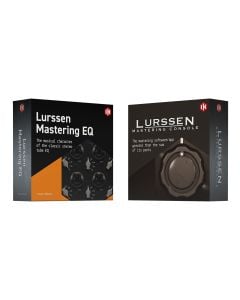
Lurssen Mastering Console is a groundbreaking new mastering tool for either iPhone, iPad or Mac/PC that puts a lifetime’s worth of professional mastering experience at your fingertips.
Created in collaboration with Mastering Engineers Gavin Lurssen and Reuben Cohen of Multi Grammy Award winning facility Lurssen Mastering, Inc. in Los Angeles, it puts you at the controls in the studio with all of the secret tools, settings and techniques that have made the Lurssen sound so sought after by the world’s top-tier recording artists and producers.
It faithfully recreates Lurssen's “whole is greater than the sum of its parts” philosophy of mastering. With it, you get a top of the line mastering processor chain that has been created and tweaked by Gavin and his team to reflect the settings they use in the studio while mastering hip-hop, rock, pop and more. With Lurssen Mastering Console, you finally have a way to make professional sounding masters no matter whether you’re in the studio or on the go.
A Sound Philosophy
Lurssen Mastering Console is a totally new approach to digital audio mastering. It provides a complete emulation of the entire mastering processing chain used by world-renowned mastering engineers Gavin Lurssen and Reuben Cohen and their team. This chain tube equalizers, solid state equalizers, limiters, de-essers and solid state compressors. The simulation of this chain reflects their “whole chain philosophy”.
Lurssen Mastering Console models and recreates the interactions between the individual processors in its chain down to the actual gear hookup schematics themselves. This approach effectively gives you access to decades worth of knowledge in the form of workflow secrets, special techniques, signal chains and technical know-how.
Hear The Lurssen Mastering Console Difference
Here are just a few examples of mixes before and after being mastered with Lurssen Mastering Console. Using the ""styles"" presets as a starting point, the mixes were tweaked in real time using push, automation, and eq controls to capture the magic in the music. (Settings for each mastered file can be found in the audio file descriptions.)
Master Your Audio Everywhere
No matter whether you use iPhone, iPad or a Mac or PC, there's a Lurssen Mastering Console for you. It is available in two different versions depending on your needs.
It's available as a universal iPhone/iPad app — just the thing for when you want to master on the go or demo your material on a wide variety of sound sources while mastering. This app is available as a free download that operates in demo mode, and features two full-functionality unlock modes : Play/Process and HD Engine.
It's available as a universal iPhone/iPad app — just the thing for when you want to master on the go or demo your material on a wide variety of sound sources while mastering. This app is available as a free download that operates in demo mode, and features two full-functionality unlock modes : Play/Process and HD Engine.
Lurssen Mastering Console helps you achieve consistently great sounding results because it lets you demo your projects on a wide variety of soundsystems thanks to its iPhone/iPad version.
Now you can take your projects with you anywhere so you can hear exactly how they perform in the wild.
A Lifetime’s Worth Of Mastering Experience At Your Fingertips
It’s easy to get great results with Lurssen Mastering Console. It comes with 40 unique mastering templates, called “Styles,” that custom tailor its mastering processing chain for hip-hop, hard rock, heavy metal, country, Americana and more. These templates eliminate all the hard work of the mastering process; Gavin and his team have set everything up for you from the signal flow to the individual settings of each processor. All you have to do is load a track, choose a template and you’ll be ready to start mastering. Or, in other words, Lurssen Mastering Console can help you achieve amazingly professional results even when a trip to Lurssen Mastering in Los Angeles just isn’t in the budget.
Streamlined Control
Once you’ve selected a template, Lurssen Mastering Console presents you with three easy to use controls that let you adjust the master to your taste. Just like in Gavin’s studio, you can adjust a linked Input Drive, adjust a five band EQ and also use a special “PUSH” knob. The PUSH knob is particularly important because it lets you subtly and uniformly nudge the EQs so you can “ride” the flow of the song and highlight parts, adding that special Lurssen magic to your masters. You also get two VU meters, a master bypass switch (quite handy for hearing your work versus the original file) and a STEREO/MONO monitoring switch. You can record the real-time adjustments to the two master knobs via the automation feature so you can really dig into the nitty gritty of your master and record your work for later.
Visualize A Waveform
Lurssen Mastering Console lets you see your audio thanks to this handy waveform display. You can loop audio here, view and edit automation data and move freely through your chosen song.
Styles And Control
Lurssen Mastering Console has been designed to sound great without any tweaking required on your part. That being said, you can view and alter some of the settings of Gavin’s processing chain thanks to the Chain view screen. Here you can view the individual components that comprise each Style template and make adjustments to things like gain reduction on specific pieces of gear. You can save your changes to the Style templates as presets, which can also store different EQ settings.
Mono, Stereo And Surround
The Lurssen Mastering Console plugin can be inserted in mono, stereo, multi-channel tracks and buses in any compatible DAW, for ultimate flexibility and usability as both mastering and mixing tool. The mono operation not only allows you to use the plugin on simple mono tracks (such as vocals, bass, guitars etc.) in regular mixing sessions, or stereo buses for stem mixing or mastering duties, but it can also be used on 5.1 surround or even greater projects, depending on the selected DAW. The parameters, presets and Styles will remain consistent across all instances on a multichannel bus when settings are linked. This will allow more precision and coherency over surround operation.
Powerful Processing And Effortless Export
As with mixing, mastering is about ensuring that your audio sounds as good as possible on as many playback devices as possible. Lurssen Mastering Console allows for an extreme degree of sonic detail thanks to its 88.2/96kHz DSP processing. Finished audio rendered with Lurssen Mastering Console sounds great in any format. It allows for export to all popular file formats from AAC to WAV, FLAC and beyond.
Projects in Lurssen Mastering Console for Mac and PC are compatible with Lurssen Mastering for iPhone/iPad. That means that if you have both applications, you can transfer your projects and use the iPhone/iPad version to hear how your work sounds on a variety of different output devices (you can also use the iPhone/iPad version to finish projects and vice versa).
With Lurssen Mastering Console, musicians finally have a way to achieve professional-quality audio mastering results any time and everywhere they go.
"THIS IS NON-REFUNDABLE SOFTWARE DOWNLOAD! (NOT A PHYSICAL ITEM)"
Computers
Mac (64-bit)
Windows (64-bit)
| SKU | XCH-IKM-1143-185 |
|---|---|
| Brand | IK Multimedia |
| Item Returns | Sorry, the item can't be returned |
|---|


Login and Registration Form